Sunday, February 24, 2019

Important: MCR Apps Must Match Previous Quarter


Mortgage Call Reports - Apps in process matchingMortgage Call Reports - Apps in process matching
They Don't Quite Match!
Did you know that one of the most common reasons an MCR (Mortgage Call Report) is questioned by a State Agency is because the applications in process do not match between quarters? We do not want to raise eyebrows with any of the state agencies so how do we check that?
The 2nd Thing I Do:
If I am working on 2018 Q4 MCR the second thing I do look at 2018 Q3 MCR and copy the amount and count of 2018 Q3 AC090 and Paste it in 2018 Q4 MCR AC010.
(Psst, Do you want to know the first thing I do? See my blog "Do this 1st when filing an MCR")
Why do I do this?
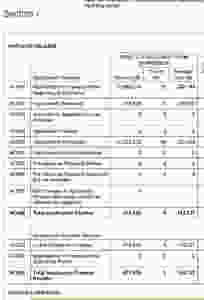
AC010 is the "Applications in Process at the beginning of the Period. (2018 Q4)
AC080 is the "Applications in Process at the end of the Period. (2018 Q3)
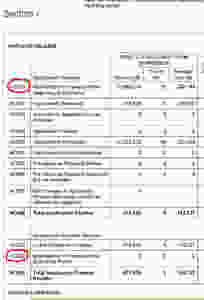
Matching Applications in Process on Mortgage Call Reports NMLSMatching Applications in Process on Mortgage Call Reports NMLS
MCR AC010
Now if on 09/30/2018 at 12:00 Midnight your applications in process is $573,634 Count 5, then on 10/01/2018 at 12:01 AM that number shouldn't change. It should be $573,634 Count 5. There should be no change at all. However, what if there is a difference?
The next thing I do is figure out where the mistake is. Usually it's an application that was closed for incompleteness. So this is where I put the difference to make the quarter's applications in process match. If it's off by one application for $94,000 I will put that difference in AC060 on either of the quarters depending of which quarter the application was closed for incompleteness.
Now your applications in process will match.
One thing to note here is you do NOT make AC080 match AC010 in the same quarter! I know this is obvious but I just want to be clear that you are matching Q3 AC080 with Q4 AC010.

SITE: www.mortgagelicensinghelp.com
Do this 1st when filing an MCR

By doing this first you will cut the time it takes to do your MCR in half!
START HERE
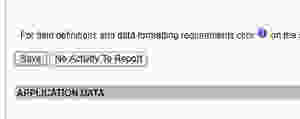
The very first thing I do is I click the button that says "No Activity To Report" and this will fill everything in with Zeros before I start entering in the data. Then click "Save".
If you don't click it at the beginning you will have to type all those zeros in every section that doesn't have relevance to your applications and loans. So do this part first every time. Now, this is where I ask the programmers at NMLS a question. Why isn't there a button that says "Fill in the blanks with Zeros"? like there is in the financial condition reports?

How to Sign an Electronic Surety Bond in NMLS


In this post I will explain how to sign an electronic surety bond in NMLS. Before you do this you must first authorize your Surety Bond Provider. Then the Surety Bond Provider needs to post the Surety Bond to your NMLS. If you have questions about "Managing Authorized Agents" in NMLS please email me.
You can see and access the surety bonds that are "Pending Signatures" from your home screen in NMLS.
Or you can click the "TASKS" tab and click the button that says "SURETY BONDS"
(Note: Here is also where you can "MANAGE AUTHORIZED AGENTS" which is where you can authorize your Surety Bond Provider.)
After you click on the "SURETY BONDS" button, click on the bond that is pending signature.
If there are no bonds in here you need to talk with your surety bond company.
Here is where you designate one of the Control Persons in your company listed under "Direct Owners and Executive Officers" in NMLS. Type in that persons NMLS number and request his signature.
Then your control person needs to log into their personal NMLS account and sign the Surety Bond.
After the control person signs the surety bond then you need to log back into the company account and finalize by submitting the bond to the regulator.
If you have any questions feel free to email me, I'm always happy to help! NMLSNerd@gmail.com
NMLS ELECTRONIC SURETY BONDSNMLS ELECTRONIC SURETY BONDS
ELECTRONIC SURETY BONDS
Site: www.mortgagelicensinghelp.com

NMLS MCR Application Pipeline


NMLS MCR Confusion?
AC010 Applications in Process at the beginning of the Period: This must match last quarters Applicatons in Process at the end of the previous period. We talked about this in a previous blog.
AC020 Applications Received: is the applications that you have received this period. When I say "this period" I mean the period we are reporting. If we are reporting 2018 Q4 that is the last three months of 2018 October, November, December. So both AC010 and AC020 are added together as your Application Pipeline. These numbers are positive numbers.
AC030 Applications Approved but not Accepted: This will subtract applications from your pipeline. These are Applications that have been Approved but the borrower has not accepted the offer of the loan. So this will be subtracted from your Application Pipeline.

AC040 Applications Denied: These are applications that were denied by the lender. This number is also subtracted from the Application Pipeline. It is a negative number.
AC050 Applications Withdrawn: These are applications that were canceled by the borrower. This is yet another negative number that subtracts from the Application Pipeline. Hey NMLS, Why do you have to be so negative? :-)
AC060 File Closed for Incompleteness: I have no idea why they use the term "Closed" here. It has nothing to do with the loan being closed. This is rather confusing to many of my clients. But basically these are forgotten applications that have been canceled in the system because the application process was never fully completed. I usually use this section to help balance out the applications in process between the quarters. Usually this is where the missing applications belong. The big question usually is which quarter were these incomplete applications canceled? It doesn't really matter... they were canceled and we don't want them in the Application Pipeline anymore. This too is another subtraction from your Application Pipeline.
AC062 Pre-Approval Requests Denied: These are pre-approval applications that have been denied.
AC064 Pre-Approval Requests Approved but not Accepted: The application was pre-approved but the borrower decided not to accept the offer of the loan. Subtracted from the Application Pipeline.
ACO65 Net Changes in Application Amount: This can be a positive or negative number. This is used if the applications in process at the beginning of period has a matching count but the dollar amount is different. This usually is because the loan amounts that the borrowers are applying for have changed.
AC066 Total Application Pipeline: This number must match AC090
AC070 Loans Closed and Funded: These are the applications that have become closed and funded loans. These loans are then entered into the Closed Loan Data below.
AC080 Applications in Process at the End of the Period: These are the left over applications that are still in process. They have not been subtracted by any of the above categories. These are applications that will go through to the beginning of next quarter.
Again if you have any questions or if you would like to hire someone to do your MCR reports for you that's what we are here for!
Happy MCRing!

Site: www.mortgagelicensinghelp.com

Don't Make this BIG MISTAKE - New Mortgage License Application Instructions


The BIG MISTAKE when applying for a new Mortgage Company License is to go into NMLS and start the MU1 Filing and pay for your company license before you have everything ready.
WARNING: Do NOT start your MU1 Filing in NMLS untils you have everything ready on the checklist.
1. Go to the NMLS Resource Center https://mortgage.nationwidelicensingsystem.org/Pages/default.aspx
2. Click on "State Licensing" then "State Licensing Requirements" in the drop down menu.
3. Pick the State that you want your Mortgage License in.
NMLS MAP
4. Select the license that you want to apply for and click "New Application"
5. Now you will have your checklist. Prepare all these items on the checklist before you start your MU1 Filing in NMLS.
Once you file your MU1 in NMLS the clock starts ticking and the State will start posting license items for all the things you are missing. They will put a deadline for you to respond and provide the missing items. If you don't get everything done quickly they will mark your license "Withdrawn - Application Abandoned"
APPLICATION ABANDONED
For Example: Some of the items you need to take care of before you file the MU1 in NMLS for the CALIFORNIA FINANCE LENDERS LAW LICENSE are:
1. DBA's Ficticious Names need to be filed with the County Clerk.
2. Resident / Registered Agent
3. Qualifying Individual
4. Financial Statement with a Net Worth of 50k for Broker Only / 250K for Lender
You can see more items by clicking on the link below that will bring you to the CA-CFL New Application Checklist.
Here is the link to the CA-CFL Application Checklist in NMLS.
https://mortgage.nationwidelicensingsystem.org/slr/PublishedStateDocuments/CA-DOC-Finance-Lenders-Law-New-App-Checklist.pdf